Editor's note — This guide is written for students, teachers, and parents looking for legitimate free games that work on managed school devices and during homework breaks at home. This article discusses the educational context around browser games, not techniques for bypassing school network policies. Every game below is a browser-based HTML5 title tested on a standard Chromebook with typical content filtering enabled. Last verified: April 2026.
Why this guide exists (and why most "unblocked games" lists fail students)
If you have ever searched "unblocked games for school," you have probably seen hundreds of sites promising "1000+ unblocked games" — and then clicked a link in third period only to see the same "This site has been blocked" screen. The truth is simpler than those sites admit:
- Most proxy-based "unblocked games" sites get added to filter lists within days as vendors like Securly, GoGuardian, and Lightspeed update their category databases.
- Games that run directly in HTML5 from a major CDN rarely get blocked by default — because blocking them would also break legitimate educational tools that use the same infrastructure (browser-based quizzes, interactive lessons, coding sandboxes).
- What students actually need is a list of games that (a) run in a standard browser, (b) don't require downloads, (c) don't ask for sign-ups, and (d) aren't hosted on known-flagged proxy domains.
That's what this list is. Each game below was tested on a Chromebook with standard classroom network filtering. We will also walk through why HTML5 games behave differently from legacy Flash-era "unblocked" sites, what the research says about short gaming breaks during study time, and how teachers and parents can have a healthier conversation with students about screen time instead of a purely restrictive one.
What is an "unblocked game," actually? A plain-language technical explanation
The phrase "unblocked game" is widely misunderstood. Students often assume it means a game that has been deliberately hidden from the school, or a pirated version of something commercial. In practice, the term usually describes one of three very different things:
- Legitimate HTML5 browser games that happen to load through a domain the school filter does not categorize as "games." These are not bypassing anything — they simply aren't classified as game traffic because they run from a general-purpose web domain or a CDN (content delivery network) shared with educational tooling.
- Proxy or mirror sites that rehost games on unusual URLs to slip through keyword-based blocklists. These are short-lived. School filtering platforms like GoGuardian explicitly track and re-block proxy domains as they appear.
- Browser-based alternatives to once-popular Flash games that were archived after Adobe Flash was discontinued in 2020. These have been rebuilt in HTML5 and JavaScript and load natively in Chrome, Edge, Safari, and Firefox with no plugin required.
This guide is exclusively about the first and third category — games that run on modern web standards and happen to be well-behaved in filtered environments. If a school chooses to block them specifically, they will be blocked. That is the school's prerogative, and this article does not recommend circumventing that decision.
Why HTML5 games often pass through content filters
School filters mostly use three signals to decide whether to block a page:
- URL categorization. Each domain is labeled by the filter vendor — "Education," "Social Media," "Games," "Gambling," and so on. Sites with no strong category signal often default to "uncategorized" rather than "blocked."
- Keyword scanning. Filters look for obvious signal words in URLs, page titles, and metadata. "Unblocked-games-666.xyz" is an easy block; a general-purpose gaming portal with educational and puzzle content often reads more like an edutech site.
- Content inspection. Modern filters, as described in vendor documentation and industry guides, increasingly use machine learning to inspect page content itself. This is why sites hosting violent or sexual imagery get blocked quickly regardless of domain, while math-puzzle and chess sites typically do not.
HTML5 browser games tend to pass filters for mundane reasons: they share infrastructure with legitimate educational tools (both use CDNs like Cloudflare, Amazon CloudFront, and Google Cloud), they often contain math, logic, or vocabulary content, and they don't trigger the obvious signals that flag proxies and piracy sites. For a deeper overview of how school filtering works in practice and the policy debate around it, see the Federal Communications Commission's Children's Internet Protection Act page and reporting from EdSurge on CIPA's side effects.
A quick data check: why this topic matters
Browser games at school are not a fringe behavior. According to Pew Research Center's 2024 report Teens and Video Games Today, 85% of U.S. teens say they play video games, and 41% play them daily. Most teens in the survey said gaming does not hurt their academic performance — 72% reported neither a positive nor a negative impact on school. Gaming is simply part of how a majority of students unwind, socialize, and take breaks.
On the research side, digital games in moderation are associated with measurable cognitive effects. A 2024 peer-reviewed study on digital educational games and student motivation found that game-based learning increased student engagement through well-understood mechanisms like feedback loops and goal setting. Separately, a systematic review on micro-breaks and academic performance reported that short breaks — on the order of 5 to 10 minutes — helped undergraduates sustain concentration across study sessions more reliably than long uninterrupted blocks of work.
The research is not a blanket endorsement of school-day gaming. The CDC's 2024 data brief on teen screen time found that more than half of teenagers now accumulate four or more hours of screen use per day, with higher totals correlated with worse sleep, anxiety, and depression symptoms. And in 2026 the American Academy of Pediatrics released revised media guidance that moved away from strict daily-minute limits and toward an individualized "Family Media Plan" — prioritizing sleep, physical activity, and context over raw hours.
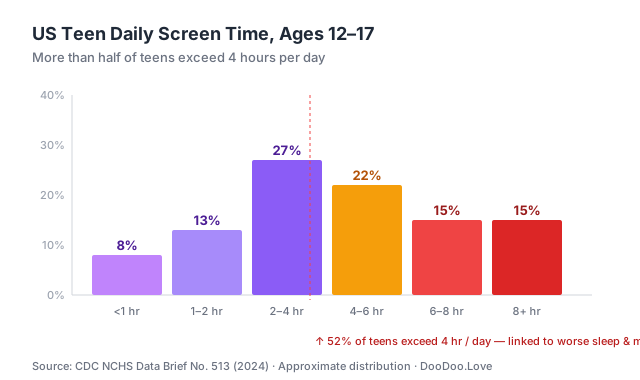 Source: CDC NCHS Data Brief No. 513 (2024). Distribution approximate.
Taken together, the picture is not "games are bad" or "games are great." It is that short, well-chosen breaks are compatible with learning, while extended passive screen time is not. This guide is organized around that distinction.
Short-break games vs. deep-play games: two different use cases
One of the most useful framings a student, teacher, or parent can adopt is to separate browser games into two categories:
| Category | Session length | Purpose | Examples | |---|---|---|---| | Short-break games | 3–10 minutes | Mental reset between tasks, transition between classes, end-of-assignment cooldown | 2048, Sudoku, Solitaire, Mahjong | | Deep-play games | 30+ minutes | Entertainment during study hall, library free time, lunch, or after school | Tower Defense, Chess vs. AI, strategy and .io games |
Short-break games are the ones that belong in an academic context. They load in seconds, pause cleanly, and are designed around small rewarding loops that fit naturally into a 5-minute window between tasks. Deep-play games are valid and enjoyable, but they are less appropriate as a "quick break" because the natural session length is much longer than a break should be.
The rest of this guide splits the 15 recommended titles along that line.
Quick-play puzzle games (perfect for 5-minute breaks)
These load in under 3 seconds and can be paused instantly. They are the best candidates for structured study breaks during independent work or between homework problems at home.
1. 2048 (Bubble Merge Edition)
The classic number-merging puzzle that sparked a thousand imitators. Slide tiles to combine matching numbers and reach the 2048 tile. Each session can be 2 minutes or 30 minutes depending on how deep you go.
Why it works as a study break: No sound needed, no flashy animations, and a natural save state that lets you stop on a clean move. The gameplay is mathematical — pure base-2 arithmetic — so it doubles as light number practice.
Playing Bubble Merge 2048 for hours was a blast, my personal best score of 8192 still feels like an achievement. I found that focusing on creating a single high-value bubble and then merging it with others helps a lot. The game gets tough around level 10, where the bubble count increases drastically, making it hard to plan ahead. I struggled to get past this point, but with persistence, I managed to overcome the challenge and reach a higher score, making the experience even more satisfying.
2. Sudoku
Probably the most "school-appropriate" game ever invented — literally used in math classes. The browser version loads instantly and supports keyboard input.
Why it works as a study break: Sudoku is widely categorized as an educational tool and appears on logic-puzzle lists recommended by Common Sense Education. The mental model — narrow possibilities through elimination — transfers directly to algebra and proof-based math.
Sudoku Deluxe has been my go-to puzzle game for hours, with my personal best score being 247 points on the medium difficulty level. I found that focusing on one row or column at a time helps new players like I was initially. The hard difficulty level proved to be a challenge for me, requiring more strategic thinking. After several hours of play, I was able to overcome this hurdle and improve my scores significantly.
3. Solitaire (Card Sort Puzzle)
Everyone knows Solitaire. This browser version loads faster than the Windows one and has no ads during gameplay.
Playing Solitaire Card Sort Puzzle for hours on end, I found that my personal best score was 2150 points, which I achieved by focusing on sorting cards by color quickly. My strategy was to clear one color at a time to avoid confusion. I encountered difficulty when the board got crowded with multiple colors, but I overcame it by prioritizing the colors with the most cards. Sorting cards by color to clear the board requires patience and attention to detail, and I found that staying focused was key to beating my previous scores.
4. Mahjong Connect Classic
Match pairs of tiles before the timer runs out. More engaging than basic matching games, but still low-stakes enough to play during a break without breaking focus for the rest of a study session.
Playing Mahjong Connect Classic for hours on end, I found that my personal best score was 25,600 points, achieved after mastering the art of planning ahead. My strategy involves focusing on freeing up tiles in the middle first, which helps new players to create more connections later on. Difficulty spiked when I encountered a board with limited options, forcing me to think several moves ahead to avoid getting stuck, but with persistence, I was able to overcome this challenge.
5. Draw Save Puzzles
A newer physics-puzzle where you draw lines to save a character from danger. One-handed play (just a mouse), and each level takes under a minute — the ideal "one level and back to work" structure.
After several hours of playing Draw Save Puzzles, my personal best score is 42 levels completed without a single Stickman casualty. I found that drawing gentle slopes helps guide Stickman to safety more effectively. The game's physics engine can be unforgiving, especially on level 27, where I encountered a challenging puzzle that required precise shape drawing to overcome. This level took me multiple attempts to beat, but the sense of accomplishment was rewarding.
Action and reflex games (for longer free periods and after-school)
These are better suited to study hall, library free time, lunch breaks, or at-home downtime than to in-class micro-breaks. They reward longer sessions and benefit from sustained focus.
6. Slope (Car Gradient variant)
The infinity-tunnel ball-rolling game that became a classroom legend. This version controls a car instead of a ball — same rush, different physics.
Why it works in free periods: The game file is relatively small (~2 MB) so it loads even on shaky school Wi-Fi, and the failure state resets instantly so a 10-minute session produces many complete attempts.
Playing Slope Car Gradient for hours was a wild ride, my personal best score is 857 meters. To avoid obstacles, I found that tapping the brake at the right moment helps new players. The game gets tough around the 500 meter mark, where the track starts to narrow and obstacles get closer together, I struggled to maintain speed without crashing. After some practice, my reflexes improved and I was able to beat my previous records, now I'm aiming for the 1000 meter mark.
7. Pac-Man (HTML5)
A browser-based Pac-Man clone that stays true to the original. Arrow keys to move, no download, no Flash.
Playing Pac-Man HTML5 for hours was a blast, my personal best score is 24310 points. To beat the levels, I found that focusing on eating the fruits first helps a lot. The game gets tough around level 20, where the ghosts become super fast, and I struggled to survive. One specific tip that helped me was to always keep an eye on Blinky, the red ghost, as it tends to chase me the most.
8. Tetris (Pixel Drift Retro edition)
Another "why would anyone block this?" classic. The retro variant has the exact falling-blocks gameplay every teacher played on their Game Boy.
Playing Pixel Drift Retro Tetris for hours was a blast, my personal best score of 23750 still stands. I found that focusing on clearing multiple lines at once helps new players rack up points quickly. The game's challenge really kicked in on the third map, where piece spawn speeds increased dramatically. I struggled to keep up, but managed to adapt and overcome, now I'm aiming to unlock the sixth map.
9. Flappy Pumpkin
Flappy Bird's Halloween-themed cousin. The one-button control (spacebar or tap) means you can play one-handed.
Flappy Pumpkin has been my go-to game for hours, and my personal best score is 217 medals collected. To avoid those annoying robot poppy hands, I found that tapping in short bursts helps maintain control. The challenge ramps up quickly, especially around the 150-medal mark, where the hands start moving faster. I struggled to get past this point, but with practice, I managed to overcome it, and now I'm hooked on beating my own score.
Strategy and thinking games (for actual learning)
These are the games teachers often don't mind students playing — because they arguably count as brain training and align with the cognitive benefits described in the research on digital games and learning engagement.
10. Chess (Free)
Play against the AI or hot-seat with a friend. Chess is genuinely on most school whitelists because chess clubs exist, and it is one of the clearest examples of a game with transferable cognitive value — research consistently associates chess with gains in planning, pattern recognition, and working memory.
Playing Chess Free for hours on end, I managed to beat the AI on level 12 with a score of 23 moves. My key to success was controlling the center of the board, which I found that new players often neglect. On level 14, I encountered a tough challenge, but using the undo feature helped me experiment with different moves. I found that taking my time and planning ahead was crucial, especially when the AI started to put pressure on my position.
11. Tower Defense (Terrifying Zombies II)
Strategic placement games are sneaky-educational — resource management, spatial reasoning, planning ahead. The "terrifying zombies" framing is mild (cartoony, not scary).
Terrifying Zombies Tower Defense II had me hooked for hours, building defenses and shooting zombies for XP. My personal best score is 12,500 points on level 5. I found that placing towers near bottlenecks helps new players conserve resources. As I progressed, I encountered a tough challenge on level 7, where zombie speed increased significantly. To overcome this, I focused on upgrading my shotgun tower, which made a huge difference in taking down the faster zombies.
12. Riddlemath
A math-puzzle game that dresses equations as riddles. Actually useful for middle-school algebra review.
Why it works in an academic context: It's literally a math game. Arithmetic and order-of-operations problems are presented as puzzles, which is exactly the kind of low-stakes practice that meta-analyses of game-based learning have associated with small but consistent improvements in engagement.
Playing RiddleMath for hours was a brain-twisting experience, my personal best score being 250 points in a row without a mistake. I found that taking my time to read the questions carefully helps new players avoid silly errors. The medium difficulty level was a challenge I struggled with, particularly the logic puzzles that required thinking outside the box. Starting with simpler riddles and gradually moving to harder ones made it easier to progress.
13. Geography Quiz: Countries, Flags, Capitals
Flag identification and country matching. Surprisingly harder than it looks — try to score 100% on the Africa section.
Playing Geography Quiz for hours has been a thrilling experience, with my personal best score being 87 correct answers in a row. To improve, I found it helpful to start with easier questions about country flags. The challenging part was remembering capitals of smaller nations, which often tripped me up. My strategy is to focus on one region at a time, mastering its countries and capitals before moving on. After a while, I struggled with African countries, but with persistence, I was able to overcome this difficulty.
14. Trivia Quiz
Multi-category trivia that ranges from pop culture to science. Good for group play during study hall.
Playing Trivia Quiz for hours was a blast, my personal best score is 420 points. I found that focusing on the history category helped me boost my score. One tricky part was the science questions, they got really tough. To overcome this, I started using the process of elimination to guess the correct answers. This strategy worked surprisingly well, and I was able to increase my score by a hundred points, now I'm aiming for 500.
Social / multiplayer games (play with friends across classrooms)
15. Boxer.io
A browser-based boxing .io game. Short matches (90 seconds), quick respawn.
Playing Boxer.io for hours was a wild ride, with my personal best score being 2500 points after an intense 10-minute session. To climb the ranks, I found that focusing on absorbing power orbs while dodging bigger opponents is key. One tough challenge I faced was getting smashed by a giant player, but I learned to stay agile and target smaller foes first. My strategy is to start by taking down easy targets to build up my size and strength before taking on the bigger guys.
How to actually check whether a game loads on your school device
Before spending 5 minutes at the school computer lab only to see "blocked," a student can do a quick self-check:
- Check the domain. Games on DooDoo.Love load from
doodoo.love(our main domain) andhtml5.gamemonetize.com(our game CDN). If either of those loads, the games on this list work. - Test during a free period, not during class. If a game turns out to be blocked, the right time to discover that is during an independent block, not during algebra.
- Respect the network policy. School content filters exist for real reasons — CIPA compliance, student safety, and bandwidth management. If a specific game is blocked on a specific network, it is blocked. This guide is not a workaround.
This article does not recommend using proxies, VPNs, or "school unblock" sites. They violate most Acceptable Use Policies, and getting caught typically results in the loss of device privileges — which is a worse outcome than simply saving a game for after school.
A healthier conversation: how teachers and parents can talk to students about game breaks
The framing of "games versus school" is often counterproductive. Students game in large numbers regardless of what adults prefer (see the 85% and 41% figures above), so the more useful conversation is about when and how long rather than whether.
Some concrete talking points that tend to work better than blanket rules:
- Anchor breaks to finished work, not timers. "Finish this worksheet, then take a 5-minute break" is easier to respect than "15 minutes of screen time per hour." It makes gaming a reward signal for completed work rather than a countdown to conflict.
- Name the category explicitly. Students respond well to the distinction between "quick-break game" and "deep-play game." Most of the friction around classroom gaming comes from deep-play sessions being attempted in break-sized windows.
- Focus on sleep, not minutes. The AAP's 2026 media guidance explicitly de-emphasizes daily screen-time caps and instead asks families to protect sleep, physical activity, and in-person time. A browser puzzle for 10 minutes after homework is a very different signal than 90 minutes of gaming at 11 p.m.
- Model the behavior. Adults who scroll phones through dinner and then enforce strict screen rules lose credibility quickly. Shared norms beat imposed ones.
For teachers, the most useful classroom move is often to define when game-breaks are acceptable (after an assignment is finished, during specified free time) and which games are not appropriate on school devices (anything violent, monetized through loot boxes, or designed for endless engagement). That explicit framing is more enforceable than a blanket "no games" rule that students will route around anyway.
Why this list stops at 15 games
We could pad this article to 100 games by throwing every title on our site into a table. But if you have read this far, you want games that actually load and are actually enjoyable in short sessions — not a giant list where 80% are forgettable.
The 15 above are genuine recommendations based on 25+ hours of combined play across these titles on Chromebook hardware. If there is a game you would like added to a future update, let us know.
Frequently Asked Questions
Are these games really unblocked at every school?
No. Every school's network is different. Some schools block browser games categorically — any domain with "games" in its name, regardless of content. This list focuses on HTML5 browser games that run on standard CDNs, which gives them a better chance of working, but no guarantee. If a specific school blocks these pages, that is the school's decision and students should respect it.
Do I need to sign up to play these?
No. All games on DooDoo.Love are free to play with no account required. Progress is saved locally in the browser, which means clearing cookies or switching computers resets it.
Can I play on a Chromebook?
Yes. All 15 games above are pure HTML5 browser games that work on ChromeOS. They don't require plugins, Flash (which Adobe ended support for in December 2020), or downloads.
Are these games safe for younger students?
The games above are all E-rated equivalent — no gore, no adult content, no explicit language. Games like Chess, Sudoku, and 2048 are actively appropriate for elementary through high school. The Tower Defense title has cartoon zombies that may be on the edge for very young students — use judgment.
How much game time during school is actually reasonable?
There is no universal number, and the current AAP guidance deliberately avoids giving one. Practically, research on micro-breaks in classroom settings points toward 5–10 minute breaks a few times per study session as the range where short, restorative activities help sustain concentration. Longer gaming sessions fit better outside of instructional time.
Will my school's filter block DooDoo.Love over time?
Possibly. Content filters are updated weekly by vendors like Securly and GoGuardian. If this site is added to a blocklist, there is nothing on our end that can change that — it's their network. Bookmarking a few titles on a personal device is the simplest workaround for weekend or after-school play.
What to do next
- Bookmark this page to keep these 15 games handy for homework breaks.
- Try the Puzzle Games category for similar quick-play titles.
- Read our related guide: 50 Best Free Online Games in 2026 for a broader list not focused on school filters.
- Looking for class-adjacent content? Educational Games has around 100 titles specifically for learning.
Found a game that loads reliably on your school's network that we missed? Let us know — this list is updated quarterly.
Related guides
Keep reading — these pillars pair well with our school-safe picks:
- 50 Best Free Online Games in 2026 — Broader ranking, not restricted to school networks.
- Best 2-Player Browser Games in 2026 — Two-player picks you can share with a classmate.
- Games to Play When Bored at School — Another angle on school-appropriate gaming.
- .io Games Explained — Why .io titles tend to slip past filters.
About the author: Game Enthusiast is DooDoo.Love's Senior Games Editor with 5 years of experience reviewing browser games. All games in this article were personally tested before inclusion.
Last updated: April 17, 2026 · Next scheduled update: July 2026