Best 2-Player Browser Games in 2026: Play With Friends, No Download
The joy of gaming often doubles when shared with a friend. In 2026, the surge of 2-player browser games is undeniable—offering instant access, no downloads, and pure fun right from your web browser. Whether a duo is on a coffee break or lounging at home, these games provide fast, engaging entertainment without the hassle of installations or hefty hardware demands. From cooperative challenges to head-to-head showdowns, there’s something here for every pair. Ready to dive in? The sections below explore the best 2-player browser games that promise memorable moments with a favorite gaming partner, backed by practical setup tips, control-layout best practices, and guidance on picking titles that bring people together rather than drive them apart.
Why 2-Player Browser Games Are Making a Comeback
It’s curious how browser games, once considered casual distractions, are reclaiming their spotlight. The appeal? Instant access and zero downloads mean minimal commitment, perfect for today’s fast-paced lifestyle. Plus, the simplicity of sharing a link beats the clunky process of coordinating console or PC setups. The rise of hybrid work and online hangouts has also fueled demand for quick, social gaming experiences. Developers are now crafting deeper, more polished 2-player experiences that are accessible on any device, from laptops to tablets.
The social dimension is not a marketing claim — it shows up clearly in large surveys. According to the Pew Research Center’s 2024 report on teens and video games, 85% of U.S. teens play video games, 89% of teen players say they play with other people (in person or online), and 72% report that spending time with others is a reason why they play. In other words, video games are overwhelmingly a social activity, and shared-screen formats like 2-player browser games map directly onto that motivation — no voice chat, no account linking, no long download required before the conversation can start.
In 2026, the nostalgia factor combined with innovative mechanics has made 2-player browser games a social glue. They fill gaps between longer gaming sessions or serve as stand-alone fun. The variety is staggering: from serene puzzles to frantic battles, the genre caters to casual and competitive players alike. What sets the best apart is their ability to create moments of laughter, rivalry, and teamwork—all in under a minute to several rounds. So, if anyone still thinks browser games are passé, the data suggests otherwise.
Same-Screen vs. Same-Network: Choosing the Right Format
Not every “2-player” game means the same thing. Broadly, browser titles in this category split into two formats, and picking the right one for a given situation is half the battle.
Same-screen (local / couch-style) games put both players on one keyboard or one touchscreen. One player takes the left side of the keyboard, the other takes the right. There is no lobby, no invite code, no sign-up — both people just watch the same screen and laugh (or argue) about the same thing. This is the classic “hand the laptop to the person next to you” experience, and it is what most of the picks in this guide are optimized for. It works on any modern browser, needs no extra hardware, and is remarkably resilient: one device, one screen, one tab.
Same-network / online co-op games let two players use separate devices connected through the same room code, share link, or matchmaking server. The upside is comfort (each player gets their own screen and their own full keyboard) and the ability to play across distance. The downside is friction: slower start-up, occasional sign-in requirements, and more sensitivity to network quality. If latency spikes, the session breaks.
A practical rule of thumb: if the players are in the same physical room, default to same-screen. It is almost always faster to start, and Quantic Foundry’s long-running gamer motivation research found that local co-op is the most consistently appealing mode of social gaming across gender and age — the only tracked mode whose appeal did not meaningfully decline with age. That preference translates perfectly to browser 2-player titles, which inherit the accessibility of local play while skipping the console-hardware barrier.
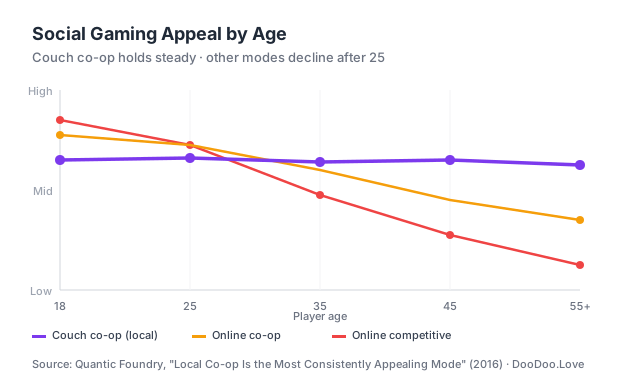 Source: Quantic Foundry — Local Co-Op Is the Most Consistently Appealing Mode (2016)
If the players are apart, pick a same-network title that supports a simple room-code join flow, and run a voice or video call on a second device so the banter is not lost. Banter is most of the value.
Best Co-op Games
Play Ragdoll Arena 2 Player →
This physics-driven brawler brings absurd ragdoll combat to two players fighting it out in unpredictable arenas. It’s chaotic but rewarding when both players master the quirky controls. Score: 8.2/10 Tip: Use environmental hazards strategically—sometimes a well-timed launch off a trap wins the round faster than punches.
Play Mind Games for 2-3-4 Player →
A collection of brain teasers and puzzles designed for cooperative or semi-competitive play. Ideal for pairs who prefer exercising their wits over reflexes. Score: 8.5/10 Tip: Communication is key here; split tasks wisely between players to maximize efficiency and beat puzzles faster.
Play Boxing Gang Stars →
A stylized boxing game with simple controls yet deep combo mechanics. Pairs can team up for tag matches or coach each other through tough AI opponents. Score: 7.9/10 Tip: Experiment with timing your punches—overcommit and you get countered, hold back and you miss openings.
Play Western Fight →
Bring the wild west to your browser with duels and cooperative shootouts. The atmospheric pixel art and frantic gunfights make this an instant classic. Score: 8.0/10 Tip: Use cover smartly; standing out in the open isn’t just dangerous, it’s a quick way to lose your partner’s trust.
Play Fish Eat Grow Mega →
Swim, eat, and grow together in this aquatic adventure. Cooperation can mean the difference between survival and becoming a snack. Score: 7.8/10 Tip: Coordinate movements to herd smaller fish toward your partner, maximizing growth speed.
Best Competitive Games
Play Chess Free →
The timeless game with countless strategies. This browser version offers smooth gameplay and an AI that scales well for novices and veterans alike. Score: 9.3/10 Tip: Surprise an opponent early with unconventional openings to throw them off balance.
Play Ping Pong →
Fast-paced and intuitive, ping pong is a brilliant test of reflexes and timing. Perfect for quick competitive bursts. Score: 8.1/10 Tip: Master the spin mechanics; a well-placed curveball can force an opponent into awkward returns.
Play Tank Battle →
Strategic artillery duels with tanks boasting unique weapons. Plan shots carefully and anticipate enemy moves. Score: 8.4/10 Tip: Don’t just aim for damage—control the battlefield by hitting terrain to limit an opponent’s mobility.
Play Boxer.io →
An arena fight game with simple controls but fierce competition. Dodge, weave, and punch through chaotic matches. Score: 7.7/10 Tip: Keep moving unpredictably; standing still makes you an easy target in crowded arenas.
Play Squid Game.io →
Inspired by the cult hit, this game pits players against one another in deadly challenges. Fast thinking and quick execution are crucial. Score: 8.6/10 Tip: Sometimes blending in with the crowd beats rushing ahead—knowing when to be cautious matters.
Best Quick-Match Games
Play Flappy Pumpkin →
A seasonal twist on the Flappy Bird formula. Quick rounds perfect for light competition or a few chill moments. Score: 7.5/10 Tip: Focus on rhythm rather than speed—each flap has a sweet spot that keeps a player alive longer.
Play Pac-Man →
Classic maze chase with a competitive twist. Short rounds filled with frantic escapes and strategic ghost chases. Score: 8.0/10 Tip: Use the power pellets aggressively but don’t get greedy—timing your power-ups can turn the tide.
Play Slope →
Fast-paced rolling ball game with tight controls and instant restarts. A test of nerves and precision. Score: 7.9/10 Tip: Look ahead instead of reacting last-second. Anticipating slopes early reduces sudden crashes.
Play Tetris →
The ultimate puzzle classic, now in a retro pixel art style. Rapid rounds that test speed and planning. Score: 9.0/10 Tip: Don’t focus solely on clearing lines; setting up combos can punish an opponent in versus modes.
Play Sudoku →
For players who want mental quick-fire rounds. Compete on who finishes puzzles fastest or with fewer errors. Score: 7.6/10 Tip: Scan for unique candidates early to lock down numbers faster than an opponent.
Picking the Right Game for the Right Pair
One of the most overlooked steps in a 2-player session is matching the game to the relationship. The same title that delights strangers can frustrate long-term partners, and vice versa. Peer-reviewed work on cooperative play argues that couch co-op video games can measurably strengthen social bonds — a 2022 experimental study, Promoting Social Relationships Using a Couch Cooperative Video Game, found that cooperative gameplay helped unacquainted players build rapport, precisely because the shared goal “hides” the awkwardness of forced interaction behind a common objective. That dynamic changes meaningfully depending on who is sitting next to whom.
For couples: Lean toward cooperative, low-stakes titles first. Games like Mind Games for 2-3-4 Player or Fish Eat Grow Mega reward communication and shared decision-making without crowning a winner and loser every round. If both partners enjoy light competition, Ping Pong and Flappy Pumpkin offer short bursts that reset quickly, so a tough loss doesn’t linger past the next round.
For close friends: This is where competitive picks shine. Friends generally have a thicker social buffer against in-game trash talk, so head-to-head titles like Tank Battle, Squid Game.io, or Boxer.io pay off. The stakes feel high, nobody takes it personally, and a well-timed comeback becomes the story of the evening.
For family play (mixed ages): Prioritize games with a flat learning curve and forgiving reset loops. Pac-Man, Slope, and Tetris let a parent and a younger sibling compete without one side dominating for structural reasons. Cooperative titles like Fish Eat Grow Mega also work well when one player is clearly more experienced — the stronger player naturally guides the weaker one without having to announce it.
For new acquaintances or office icebreakers: Ragdoll Arena 2 Player and Boxing Gang Stars hit a sweet spot. Controls are simple enough that nobody feels judged for not knowing the mechanics, and the physics-driven absurdity creates laughter that lowers social tension fast. This is the scenario the cooperative-play research cited above was built around, and it holds up in practice.
How to Set Up 2-Player on One Device
Setting up 2-player browser games on a single device is surprisingly straightforward. Most games support split controls—usually WASD or arrow keys for Player 1 and IJKL or numpad for Player 2. Before jumping in, test the controls in the menu or settings screen to avoid awkward hand cramps. Position both players on opposite sides of the keyboard or device to reduce finger tangles. If playing on a tablet, landscape mode can offer better screen real estate for two thumbs. Lastly, ensure the browser is up-to-date for smooth performance and minimal input lag—nothing kills the fun faster than an unresponsive game.
Control-Allocation Best Practices
A surprising amount of friction in shared-keyboard play comes from poor control layout rather than poor games. A few practical rules tend to help:
- Give the left side of the keyboard to the player whose dominant hand is on the right. Most browser 2-player games default to WASD for Player 1, and WASD is optimized for a right-handed mouse user to use with the left hand. A right-handed player on the left side of the keyboard will feel comfortable; a left-handed player may prefer swapping sides.
- Keep action buttons close to the movement cluster. If a game asks Player 2 to use arrow keys for movement and Enter for action, the action key is a long reach. Prefer games that place shoot/jump/attack keys inside the same hand span as the movement keys (for arrow-key users, that usually means Right Shift, Right Ctrl, or the numpad zero).
- Separate the two players by at least one empty key column. WASD and IJKL work well because the two hand clusters don’t overlap. WASD and arrow keys on a compact laptop keyboard can get tight — in that case, reach for an external keyboard if one is available, or switch to a game with IJKL support.
- Confirm the layout before the match starts, not during. Ten seconds of testing in a menu prevents ten minutes of finger-swapping mid-round, which is also the fastest way to make someone genuinely upset about a game of browser ping pong.
- For touchscreen play, use landscape mode and split the screen mentally in half. Each player gets one thumb zone. Games that place both thumb zones at the bottom corners (instead of top and bottom) are strongly preferred because they prevent hands from crossing.
Audio and Display Tips
Turn volume up slightly beyond what a solo player would choose — two people looking at the same screen are, by definition, not both at the optimal viewing distance, and shared audio cues matter more when one player is slightly further away. If the device supports it, maximize the browser window and hide the bookmarks bar. Every vertical pixel counts when two characters need to stay on-screen simultaneously in a side-scroller or top-down arena.
Avoiding the Argument: How to Choose Games That Bring People Together
2-player gaming is supposed to end in a high-five, not a cold shoulder. A handful of selection heuristics dramatically reduce the chance of a session going sideways.
Prefer short rounds over long runs. A 60-second round resets fast, so a loss doesn’t compound. A 20-minute match with no mid-session save turns one bad play into a grudge. Flappy Pumpkin, Ping Pong, and Slope all reset in seconds. This is especially important when players have a competitive-skill gap.
Mix co-op into competitive sessions. Alternating two rounds of Tank Battle with one round of Mind Games for 2-3-4 Player changes the emotional register. Cooperative interludes let the losing player re-enter on equal footing, and they reinforce that the point of the evening is the other person, not the scoreboard.
Handicap the skill gap openly, not silently. If one player consistently wins at Chess Free, agree upfront on a time handicap or a piece-odds rule. Covert sandbagging (pretending to play badly to keep things close) usually gets spotted and feels worse than losing honestly.
Avoid games that reward griefing without counters. Some arena titles let one player dominate through a single repeatable tactic. These are great for solo practice but poisonous for mixed-skill 2-player sessions. When a game’s best strategy looks like “do the one annoying thing repeatedly,” rotate to a different title.
End on a cooperative note. Close the session with one round of a co-op game, even a short one. It leaves both players with a shared-victory feeling rather than a win-loss tally, and it is the single cheapest way to make sure “want to play again next week?” gets a yes.
Keep a short bench. A rotation of five or six trusted titles beats scrolling through a hundred unfamiliar ones. Decision fatigue is a real source of friction — the minute spent choosing a game is a minute not spent playing it. The curated lists above are designed to be that bench.
FAQ
Q1: Can these games be played on mobile devices? Most 2-player browser games work on modern smartphones and tablets, though games requiring precise keyboard inputs might be better on desktop or laptops. Touchscreen 2-player games generally work best in landscape mode with thumb controls at the bottom corners of the screen.
Q2: Is an account needed to play these games? Nope. The beauty of browser games is instant access—click the link and start playing without sign-ups. This is one of the reasons the format has rebounded so strongly for social play: the lowest possible barrier between deciding to play and actually playing.
Q3: How can a friend be invited to play? Simply share the URL link of the game. Many of these games generate private rooms or lobbies for both players to join and play together. For same-device play, no invite is needed at all — both players just sit down at the same keyboard.
Q4: Are these games safe and free from ads? While all listed games are free, some may display ads. Keep an eye on pop-ups and avoid clicking unintended ads. Use trusted browsers for an ad-light experience, and prefer browsers with built-in tracking protection for younger players.
Q5: What’s the difference between couch co-op and online co-op in a browser context? Couch co-op means both players share one device and one screen. Online co-op means both players are on separate devices connected through a shared room code or link. Couch co-op is faster to start and more social; online co-op works across distance and gives each player their own full input device. Both formats are covered by titles in this guide.
Q6: Which games work best for mixed-age family play? Titles with simple control schemes and short rounds tend to work best across age groups. Pac-Man, Tetris, Slope, and Fish Eat Grow Mega all meet that bar. Avoid reflex-heavy competitive titles when one player is significantly younger — the skill gap widens fast and the sessions stop being fun.
Q7: Do these games require a fast internet connection? Same-device 2-player browser games typically load once and then run locally in the browser, so after the initial load a fast connection is not required. Online 2-player titles that rely on a shared lobby do benefit from a stable connection, but most are designed to tolerate typical home Wi-Fi without issues.
Related guides
Looking for more ways to play? These pillar guides pair well with 2-player picks:
- 50 Best Free Online Games in 2026 — A definitive ranking across every genre.
- Best Unblocked Games for School in 2026 — School-network-friendly picks.
- Games to Play When Bored at School — Lightweight options for study hall.
- .io Games Explained — Real-time multiplayer .io titles explained.
Author: Game Enthusiast